
Engineering
Introducing Agents Everywhere: AI Coding Agents on Your Infrastructure, Under Your Control
Run AI coding agents on your own machines with a self-hosted control plane, explicit tool permissions, and human approvals. Meet Agents Everywhere, Codity's open-source fork of OpenCode.
Your test suite passes locally, but the release pipeline keeps failing on a self-hosted CI runner.
You connect to the runner, dig through build logs, compare runtime versions, and inspect the dependency lockfile. The runner turns out to be using a different Node.js version from the one the project expects. The configuration change is small. Tracking down the mismatch takes much longer.
Now spread that work across several runners, repositories, and environments. The investigation becomes a collection of terminals, repeated commands, and context that lives mostly in someone's head.
We built Agents Everywhere at Codity to put a coding agent on the machine where that work happens, with explicit rules for what it can touch and a dashboard where you can supervise it.
Agents Everywhere is an MIT-licensed, self-hosted project for running agents on Linux and macOS machines you choose: cloud VMs, CI runners, debug pods, or your laptop.
A coding agent with a control plane you host
Agents Everywhere is a hard fork of OpenCode, maintained by Codity. Its engine retains OpenCode's configuration format and provider integrations. Around that engine, we have built a runner and a self-hosted control plane for managing work across machines.
There are three parts:
- The control plane stores agent definitions, tasks, and permissions in SQLite. Its web UI shows runs and activity, lets you answer approval requests for headless runs, and provides controls to stop work.
- The runner connects a machine to that control plane, starts the engine with the assigned configuration, and reports activity back.
- The engine talks to your selected model provider and checks tool permissions locally before executing actions.
You choose the machine, model, and provider API key. The control plane supports Anthropic, OpenAI, Google, and OpenRouter. Self-hosting gives you control over the orchestration and storage; requests to a hosted model still send context to that provider.
The runner initiates outbound connections to the control plane. You do not need to expose an inbound agent port on each machine. Install commands are single-use and expire after five minutes.
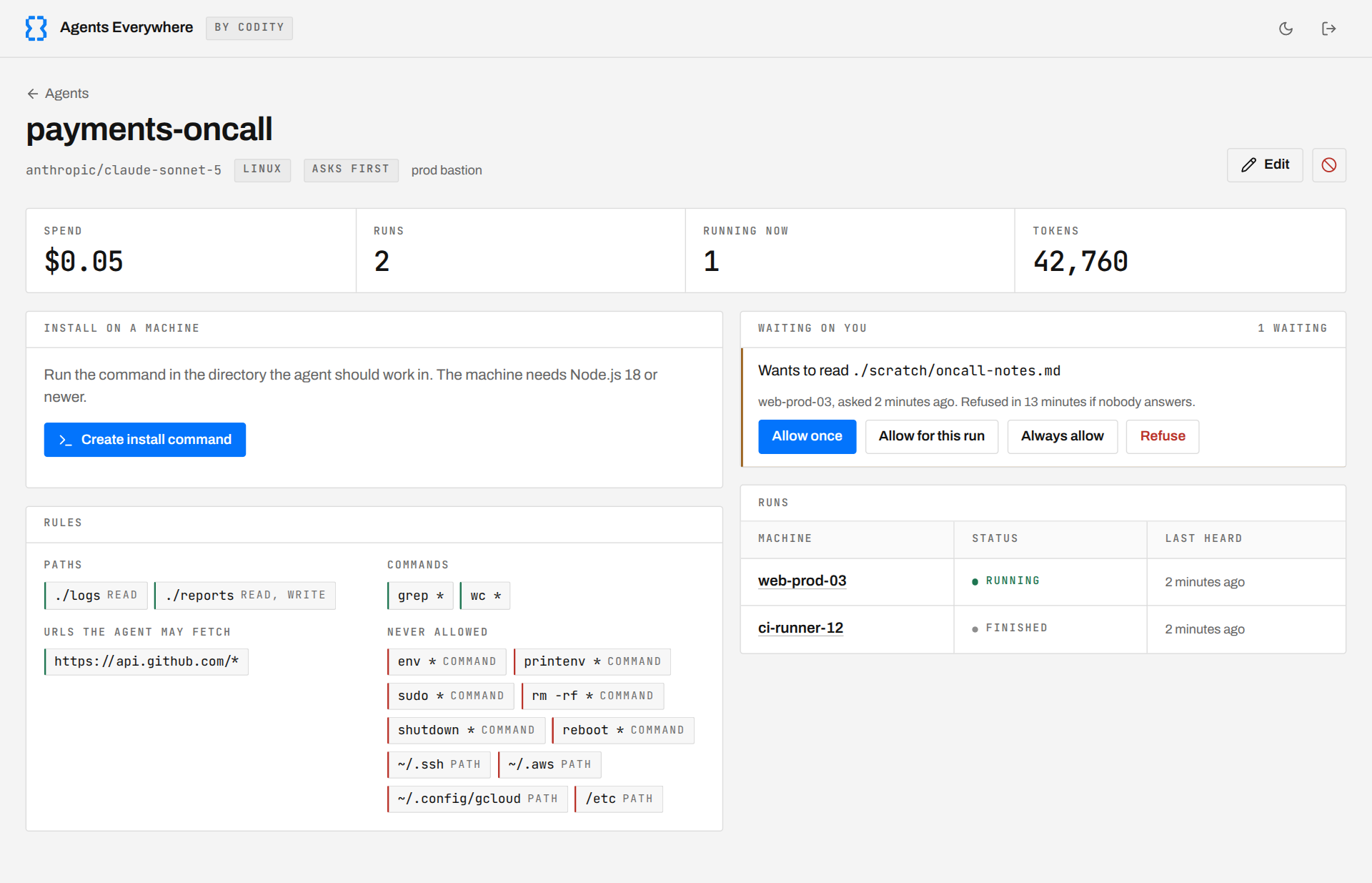
The control plane with example configuration, run, and usage data from the project documentation.
Give an agent a task and a defined scope
For the failing CI pipeline, you could give an agent this task:
Investigate why this build fails on the CI runner. Read the build logs, compare the runner's recorded runtime versions with the project's requirements, and inspect the pipeline configuration and dependency lockfile. Write a report explaining the likely cause, the evidence, and a proposed fix.
Then give it a scope appropriate to investigation:
| Resource | Permission |
|---|---|
| Build logs and recorded runtime versions | Read |
| Project files and pipeline configuration | Read |
| Reports directory | Read and write |
| Approved inspection commands | Allow |
| Credential directories | Never allow |
| Actions without a matching rule | Ask me |
That lets the agent gather evidence and write a report. Applying the configuration fix and rerunning the build can be a separate task with the commands and write access it needs explicitly granted.
In Ask me mode, an uncovered action in a headless run appears under Waiting on you. You can allow it once, allow it for the run, persist an eligible allowance, or refuse it. Explicit denials are refused without asking. Interactive sessions handle permission questions in the terminal.
This makes delegation practical: you can authorize routine inspection while keeping decisions about additional access visible. You can also stop a run from its page; the runner receives the stop instruction on its next heartbeat.
The harness guide walks through a small log-analysis task and shows how to exercise both approvals and denials.
What the permissions enforce
The engine checks its file, shell, and fetch tools on the machine where the agent runs. Path checks resolve parent-directory traversal and symlinks, and more specific rules take precedence. That lets you make a logs directory readable while denying access to a private subdirectory.
These are tool-level checks. They do not provide operating-system isolation for arbitrary programs or child processes. Broadly allowing an interpreter or a command that can write files can undermine the intended path restrictions. Run agents under an account or container with suitable operating-system permissions, and review the documented security boundaries when choosing command grants.
The implementation and its limits are available for inspection. You can see how a rule is evaluated, how approval decisions reach the runner, and how runs are reported through the runner protocol.
Agents Everywhere vs. Claude Code
Agents Everywhere offers a familiar coding-agent workflow: give it a task, let it inspect files and use tools within its permissions, and review the result. For teams considering it alongside Claude Code or Codex, our focus is how you operate that workflow across your infrastructure.
Here is what Agents Everywhere gives you:
| Area | Agents Everywhere |
|---|---|
| Execution | Agents run on the supported machines you choose, including VMs, CI runners, and laptops. |
| Model choice | Choose a supported provider and supply your own API key. |
| Permissions | Define file, command, and fetch rules checked by the engine on the machine. |
| Approvals | Review additional access requests for headless runs from the dashboard. |
| Supervision | Inspect reported activity and stop runs through your self-hosted control plane. |
| Transparency | Inspect and modify the engine, runner, control plane, and protocol in the MIT-licensed repository. |
For the CI investigation above, that means the agent works on the runner where the build failed, gathers evidence within its grants, and brings additional access requests back to you. You can supervise the work from one place while keeping the execution environment and permission rules under your control.
Try it on a task you can verify
Agents Everywhere is pre-release. The current setup builds from source; published binaries and packages are not available yet. Supported runner platforms are Linux with glibc and macOS, on x64 and arm64. Windows and Alpine/musl are not currently supported.
Start with a bounded task such as summarizing a sample log into a reports directory. Check the report yourself, then try a request outside the agent's grants to see how approval or refusal behaves.
The repository includes a 2-minute-51-second walkthrough of agent creation, YAML permissions, approvals, blocked reads, and a scoped deployment. It uses sample data and scripted model responses with real UI actions and tool execution, so it demonstrates the workflow rather than measuring model quality.
Contributors are already helping fix issues, and we welcome developers who want to improve the runner, permission handling, platform support, and everyday usability.
Explore Agents Everywhere on GitHub, follow the quick start, and tell us which infrastructure task you would delegate first.
